This is the result of session 2 in my course on Social Robot Design (2025/2026). Session 2 is all about storybuilding. The goal here is to find a specific story building tool (like storytelling, scripts, storyboard, improv theatre) and go through that process to figure out more about your particular scenario. Let’s consider a scenario for now, like a study session.
This was done with:
- Liz van Ginderen (s27349745)
- Anna Hornman (s3056600)
- Oyindrila Sen Gupta (s3697762)
- Sarah Mans (s2306379)
1. Research Tools for Scenario-Based Design
In this section we had to research tools for scenario-based design. We brainstormed on what tool we could use, and drafted our own tool; A The office style documentary.
Develop the Tool
We wanted to think about what could work. We liked wizard-of-oz approaches but wanted a bit more freedom with a rigid storyline.
- Open-ended script with improv — like actors (rigid), but with freedom.
- Or: give the script, but introduce stochastic elements.
- Sort of a Wizard of Oz, but with a script.
Tool Ideas
A The Office-style documentary
- Shows the story, interaction, setting, etc.
- Also gives people in the story the opportunity to share their perspective — explaining their actions, thoughts, and motives.
- Only the robot itself cannot do this → Or can it?
Worst idea brainstorm as a script
- Has the structure of a script and the sarcasm and sharpness of improv.
- Add all the nightmares of directors:
- Children
- Animals
- Autonomous robots
- Etc.
1 and 2 combined
Our Designed Tool: HRI Office-Script Template
The template extends scenario-based design1 with a mockumentary-style breakout interview (ala The-Office). The breakout field forces the team to separate the robot’s intent and emotion from its action. This separation is important for HRI specifically. A human actor can show intent and emotion through tone or facial expression, but a robot cannot rely on that since it often has limited degrees of freedom. It has to communicate intent and emotion on purpose, through things like light, sound, or movement. A generic scenario tool only asks “what does the character do?” Our template also asks “how would someone even know what the robot means?” through the breakout sessions. This is what helped us catch the Deaf-student case.
A visualization of the different stages is given below:
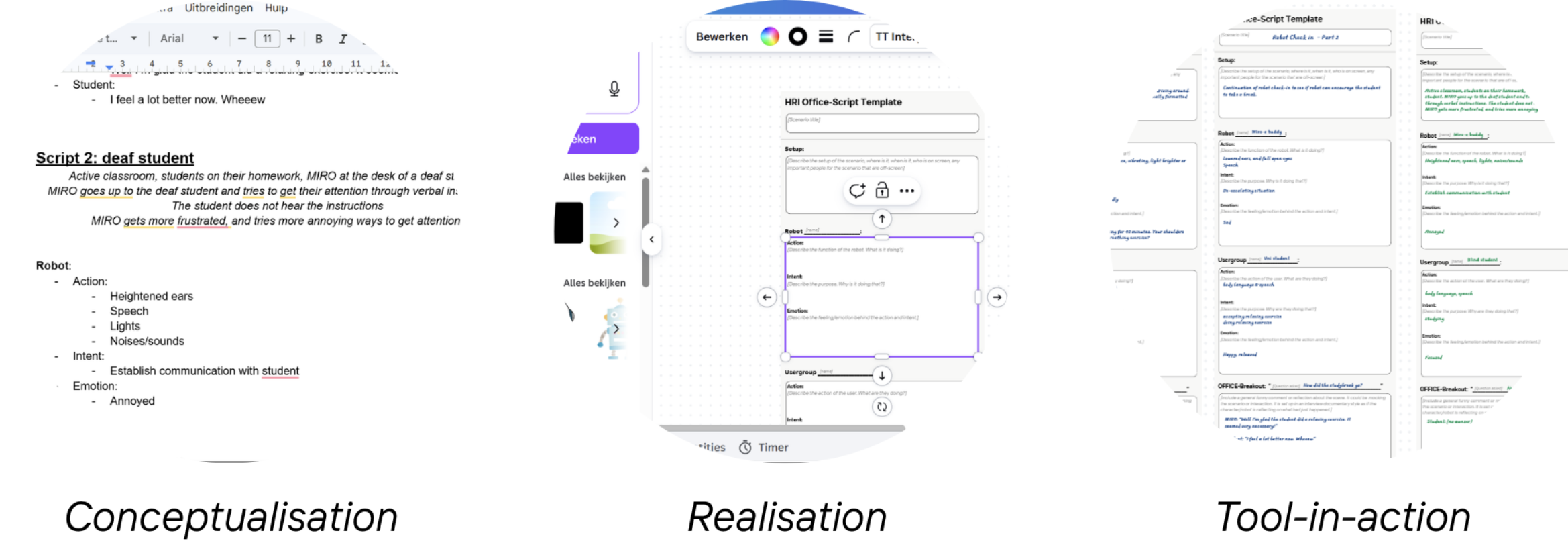 Figure 1: Conceptualisation, realisation & tool-in-action. Shows the HRI Office-Script Template structure.
Setup
Describe the setup of the scenario: where is it, when is it, who is on screen, and any important people who are off-screen.
Robot [name]
Action
Describe the function of the robot. What is it doing?
Intent
Describe the purpose. Why is it doing that?
Emotion
Describe the feeling/emotion behind the action and intent.
[User Group]
Action
Describe the action of the user. What are they doing?
Intent
Describe the purpose. Why are they doing that?
Emotion
Describe the feeling/emotion behind the action and intent.
🎙 OFFICE Breakout: [Question asked]
Include a general funny comment or reflection about the scene — mocking the scenario or interaction. Set up in an interview documentary style, as if the character or robot is reflecting on what just happened.
Worked-Out Scenarios
Two scenarios were developed: one representing a frequent use case, the other an edge case.
Research Questions
These are the research questions we gathered.
- At what point did the robot feel too human or too mechanical?
- How long did the student tolerate the robot before getting annoyed? What does an appropriate “check-in” look like?
- Did The Office-style documentary format help the team understand motives better than standard role-play?
Participant Profile
Students aged 18–25
Scenario 1 — Frequent Use Case
During a study session, the Miro-E robot interrupts the student to perform a well-being check.
Core tension: The student’s desire to focus conflicts with the robot’s need to check in.
Does the intervention feel supportive or intrusive?
Scenario 2 — Edge Case
Same setup, but the student is Deaf. The robot fails to adapt and instead repeats itself — progressively louder and more intrusive.
Roles
| Role | Notes |
|---|---|
| Robot | Played by a human |
| Student | Played by a human |
| Off-camera interviewer | Characters may break the fourth wall to speak directly to camera, explaining their internal state |
2. Literature check
As a sanity check we did a quick literature review that validates our ideas. 2 discusses using an autonomous social robot (the “nightmare” of a script or play). So adding these elements can be a nice addition. There is not much work on specifically social robots combined with an office style documentary. Although multiple books/literature has been written on integrating different scenarios, like The murderbot diaries. But also design research through documentary 3. There is also literature to back up the storyboard/ scenario based design in 1.
3. Evaluate Scenario 1
Script 1: Robot Check-In
Active classroom, students working on their homework, Miro-E robot driving around. The robot comes across a student. The script is intentionally broad to allow for improv-like adaptations.
An image of the scenario is shown here, but also worked out below in text.
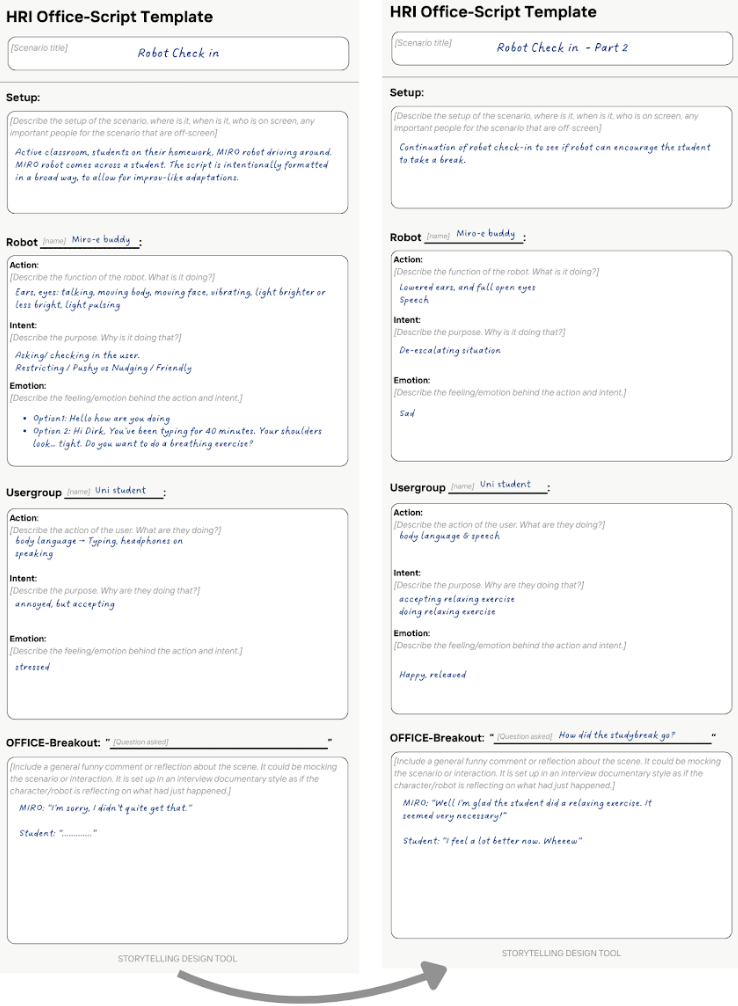 Figure 2: Tool-in-action — Scenario 1 (frequent use case), robot check-in during a study session.
Robot
Action — ears, eyes
- Talking
- Moving body / face
- Vibrating
- Light brighter or dimmer
- Light pulsing Intent — asking / checking in
- Restricting / Pushy
- Nudging / Friendly
Option 1: “Hello, how are you doing?” Option 2: “Hi Dirk, you’ve been typing for 40 minutes. Your shoulders look… tight. Do you want to do a breathing exercise?”
Student
Action
- Body language: typing, headphones on
- Speech Intent: Annoyed, but accepting
Emotion: Stressed
Robot
Input: User has been working for 45 minutes without a break.
Action
State 1
- Ears perk forward
- Light slowly gets brighter
- Robot moves forward a few cm State 2
- Ears turn back
- Light slowly gets dimmer
- Robot moves back a few cm
The robot switches between these two states every 30 seconds until the user interacts.
🎙 OFFICE Breakout
Miro: “I’m sorry, I didn’t quite get that.”
Student: (no response)
Robot
Action
- Lowered ears
- Speech
- Big eyes Intent: De-escalating the situation
Emotion: Sad
Student
Action
- Body language
- Speech Intent: Accepting the relaxing exercise
Emotion: Happy
Robot
Action
- Heightened ears
- Speech Intent
- Happy dance
- Commence relaxation exercise Emotion: Happy
Student
Action
- Body language
- Speech Intent: Doing the relaxing exercise
Emotion: Relieved
🎙 OFFICE Breakout
Miro: “Well, I’m glad the student did a relaxing exercise. It seemed very necessary!”
Student: “I feel a lot better now. Wheeew.”
4. Evaluate Scenario 2
Script 2: Deaf Student
Active classroom, students working on their homework. Miro-E is at the desk of a Deaf student. The robot tries to get their attention through verbal instructions. The student does not hear. Miro-E grows more frustrated and tries increasingly intrusive ways to get attention.
An image of the scenario is shown here, but also worked out below in text.
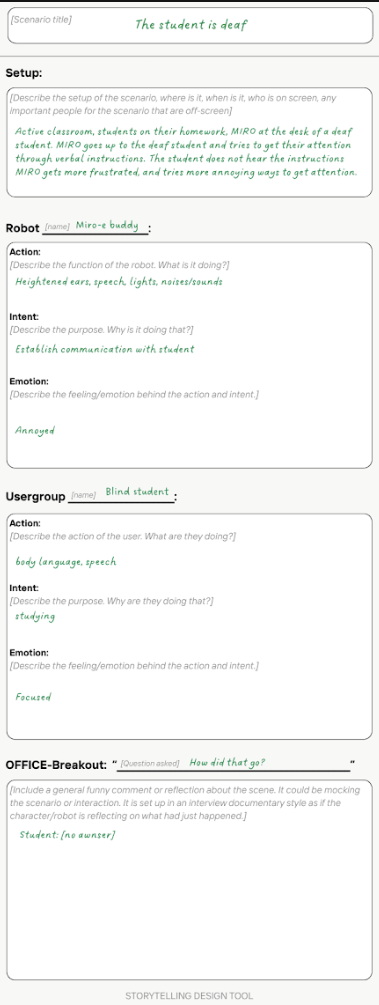 Figure 3: Tool-in-action — Scenario 2 (edge case), robot interaction with a Deaf student.
Robot
Action
- Heightened ears
- Speech
- Lights
- Noises / sounds Intent: Establish communication with the student
Emotion: Annoyed
Student
Action
- Body language
- Speech Intent: Studying
Emotion: Focused
🎙 OFFICE Breakout: “So, how did you feel about that?”
Deaf student: (no answer)
Robot
Action
- Moving back and forth
- Wheels Intent
- Get the student’s attention
- Commence relaxation exercise Emotion: Frustration
Student
Action
- Looks up at the robot
- Stays silent Emotion: Confused
🎙 OFFICE Breakout
Deaf student: “This robot is acting really weird. I have no idea what to think of this.”
Evaluation
I think the tool did help to produce a better design decision because we could play out the scenarios and detect edge cases/ cases that weren’t so obvious in the beginning 1. I feel like this helped shape a better design direction. I would say the tool is specific and generalizable, since we have a storyline that can change each run. I would change it to have a bit more direction, since now it is very free form and could lead scenarios not meant for the tool.
Application to our case
We ran the HRI Office-Script Template on two scenarios: a frequent use case (well-being check-in) and an edge case (Deaf student). When acting them out we found a tension between “nudging” and “pushy” robot behavior that weren’t obvious on paper. Especially in Scenario 2 where the robot’s escalation (repeating itself louder) assumes the student can hear it at all.
🎙 OFFICE Breakout: “So, how did you feel about that?” Deaf student: (no answer)
This helped informed our design decision: Miro-E needs another modality other than speech to escalate (light/movement first, sound secondary).
Exploring future use: Scenario based design https://research.utwente.nl/en/publications/exploring-future-use-scenario-based-design/ ↩︎ ↩︎ ↩︎
Design patterns for an interactive storytelling robot to support children’s engagement and agency, https://research.vu.nl/en/publications/design-patterns-for-an-interactive-storytelling-robot-to-support-/ ↩︎
Design documentaries: inspiring design research through documentary film, https://dl.acm.org/doi/abs/10.1145/1142405.1142441 ↩︎